


A website builder asks for an image URL, but the image is already sitting on your laptop or visible in another browser tab. At that point, the request can feel strange because you already have the picture and may not understand what another "image address" is supposed to add.
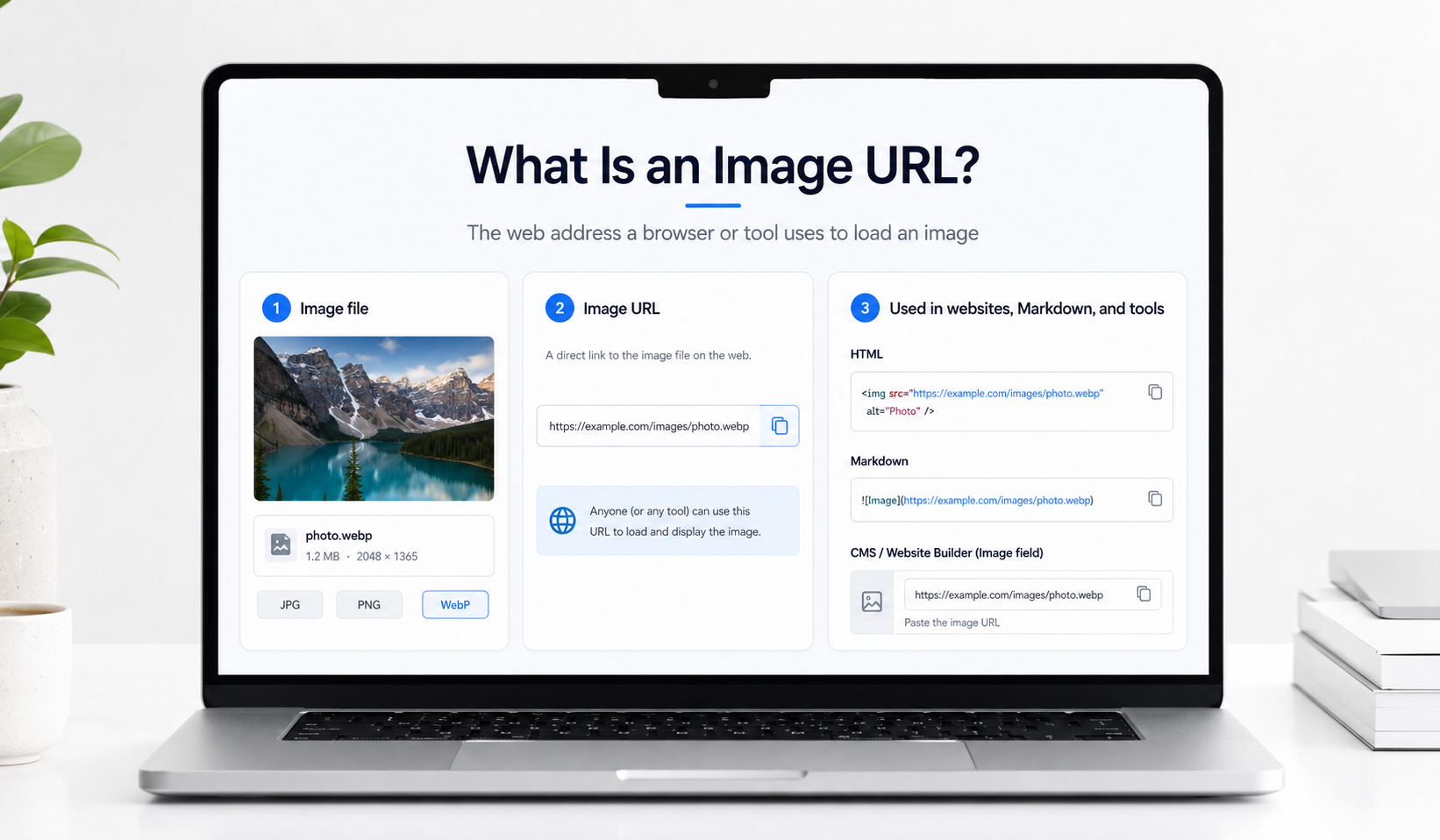
What the website needs is a location it can reach on its own. Your local image file lives on your device, while an image URL gives a browser, app or another online tool an address from which it can request that image later.
The idea is simple once that difference becomes clear. The image is the actual file, while the URL is the online address used to find it.
Quick answer
An image URL is the web address a browser or another tool uses to find and load an image online.
For example:
https://example.com/images/photo.jpg
You may use an image URL inside website HTML, Markdown or a CMS field that asks for an image source instead of another file upload. The URL does not always have to end in .jpg or another image extension, because many CDN and generated image addresses use longer paths or parameters.
The important part is that the address reaches an image that the receiving website or application is allowed to load.
What an image URL actually is
Think about a photograph saved as photo.jpg. That filename helps your computer identify the file, but somebody visiting your website cannot load the photograph from your Downloads folder.
Once the image is stored somewhere accessible on the web, it can have an address such as:
https://example.com/images/photo.jpg
That address is the image URL. When a browser or another tool needs the image, it requests the address and uses the response it receives from the server.
This is why an image URL is more than something you click. It is also the location another website or application can use when the image needs to appear again without asking you to upload the file every time.
Why this becomes confusing so easily
The confusion usually starts because seeing an image and having a reusable image URL are not the same thing. A photograph may already be open in your browser, but the address in the bar could belong to a gallery, cloud storage preview or another webpage built around that photograph.
The difference often appears only after the link is pasted somewhere else. A website image field expects the image source, but the copied address opens a page with menus or a preview around it, so the image never appears where you expected.
A useful habit is to look at what the destination field is asking for. If it says image URL, image source or something similar, the platform usually wants an address it can use to load the image itself rather than a page where a person can view it.
If the image works when you open it but disappears after you place it on the website, our guide on why an image URL does not work in HTML covers the actual checks to make next.
What does an image URL usually look like?
A simple image address is easy to recognise:
https://example.com/images/photo.jpg
In this example, https:// is the scheme, example.com identifies the host and /images/photo.jpg is the path used to reach the resource.
A CDN link may look more like this:
https://cdn.example.com/a8f2/image?w=900&format=webp
Nothing is automatically wrong because the address is long or does not end in .jpg. The better question is whether the URL gives the receiving browser or tool a usable image response.
Where you actually use an image URL
Image URLs become important whenever the next tool asks for an address instead of another file upload. That happens in code, but it also happens inside normal editors where somebody may never see a line of HTML.
The same hosted image can therefore move through very different workflows. What changes is not the image itself, but the place where its URL is being used.
On websites
Website code is one of the clearest examples because the URL is visible inside the HTML:
<img src="https://example.com/images/photo.jpg" alt="Photo">
The src attribute tells the browser which image resource it should use. That is the job of an image URL in its simplest form.
The same thing may happen without anyone writing HTML. A website builder can show an Image URL field, and pasting the address there simply gives the builder the source it should use behind the scenes.
Imagine a product page where the photo is already hosted somewhere else. Uploading another copy into every page is unnecessary when the builder accepts the existing image URL, because the page can load the same hosted source instead. That only works well when the source is meant to be used this way; a private cloud link or preview page may still open for you while failing for visitors.
Images are not a minor part of modern webpages. HTTP Archive's 2025 page weight research shows that image bytes remain a major part of transferred page weight, which is one reason websites often care about how images ahost agained and delivered rather than only whether they appear.
In Markdown
Documentation tools and README files often use Markdown instead of normal HTML. The syntax looks different, but the image still needs an online source:

The renderer reads the URL and requests the image when the document is displayed. If the address leads to a preview webpage rather than the image resource, the result can fail even though clicking the same link works in a normal browser.
In CMS tools and without code workflows
Image URLs are not only a developer feature. A CMS may ask for an external image source, while an automation can take an image URL from a spreadsheet and place the same image into another workflow.
The experience is usually simple from the user's side. You paste the address into a field, the platform fetches the image and a preview appears if that URL is usable.
Problems become obvious just as quickly when the wrong link is pasted. Instead of the photograph, you may get an empty field or a broken preview because the tool received a webpage or a restricted source.
In product feeds and catalogue sheets
Product data often travels separately from the actual product photographs. A catalogue sheet may contain the product name and price in one set of columns, while another column stores the image URL the website or marketplace will use.
This becomes especially helpful when several records need to refer to the same hosted image. The file stays in one place while the catalogue keeps the address needed to retrieve it.
If the image changes later, the behaviour depends on the hosting workflow behind that URL. A completely new address means every stored reference may also need to be changed, while a managed replacement workflow can avoid some of that additional work.
When the same image appears in several places
The value of an image URL becomes easier to notice when the same graphic is used repeatedly. A campaign image may appear on a landing page today and then turn up again inside a blog card or another internal tool.
A reusable hosted address means each place can refer back to the same image instead of requiring another manual upload. That can make updates easier to understand because there is one known source rather than several copies saved under slightly different filenames.
Reuse still needs some care. If changing the original file would unexpectedly alter every place using it, a separate image version may be safer for that new purpose.
When one image needs more than one website size
Reusing the same image does not always mean sending the exact same file to every layout. A small card and a large article image may need different dimensions even though they come from the same source.
With a service that supports image transformations, the website can request another size or crop while the original image remains stored once. Media2URL supports this for eligible images through URL transformations, including supported WebP or AVIF output.
The Image Editor still makes more sense when the content itself needs to change. A transformation is for delivery differences such as size or crop, while editing changes what is actually inside the image.
Direct image URL vs page link
This is where many image URL mistakes actually begin. A share link can show the photograph perfectly because it opens a webpage built for a person, while another tool may be waiting for the image resource it can load on its own.
For example:
https://example.com/share/photo
might open a page with the image and some controls around it.
A different address may return the image itself:
https://cdn.example.com/a8f2/image
The second URL does not need a visible .jpg ending to be useful. What matters is what the final request returns, not whether the address looks like a traditional filename.
If you are deciding which Media2URL output to copy, our direct URL vs share page guide explains the difference in more detail.
| Link you copied | What usually opens | Good choice when |
|---|---|---|
| Direct image URL | The image resource | A website or tool needs the image |
| Share page URL | A webpage around the image | You are sending the image to a person |
| Private image link | Image or access screen depending on permission | The recipient has the required access |
| Temporary image URL | The image while the link remains valid | The image needs only access for a short period |
Where does an image URL come from?
An image first needs to exist somewhere that can serve it online. That may be your own website, a CMS media library or an image hosting service designed to provide reusable URLs.
Some cloud storage services can also provide links, although the first address they show may be designed for sharing rather than direct image use. This is why copying the most obvious link after an upload does not always produce the address another website is expecting.
If the photograph currently exists only on your phone or computer, there is no public image URL to copy yet. The file has to be uploaded to an online location before another website can request it.
When the goal is simply to turn a local image into a hosted address, the Image to Link tool handles that step directly. After the upload finishes, use the direct image output when another website or application specifically asks for the image source.
How can you check whether an image URL is usable?
The quickest first check is to open the link outside your normal signed in session. A private browser window can reveal whether the image depends on an account you already have open or whether the address leads to a preview page instead.
The real test should match the place where the image will be used. If the URL is going into HTML, place it inside a simple <img> element; if a Markdown editor will use it, test it there rather than assuming a successful browser click proves everything.
When the behaviour is still unclear, inspect the actual URL response instead of repeatedly changing the link. Media2URL's Link Doctor can follow supported public URLs and show details such as the HTTP result, redirects and final content type.
If the URL appears to be correct but the website still refuses to display it, continue with the dedicated image URL troubleshooting guide rather than trying random changes to the address.
When you do not need to think about the image URL
Many website builders create and manage image URLs in the background. You upload the photograph into the editor, select it from the media library and never need to copy the final address yourself.
The URL still exists because the browser needs somewhere to request the image from, but the platform handles that part of the workflow for you. There is no benefit in hunting for the raw address when the editor already manages the image correctly.
An image URL becomes important when another service specifically asks for one, when the same hosted image needs to be reused elsewhere or when you are working directly with HTML or another workflow based on links.
The mistakes usually happen around the link, not the image
When an image refuses to appear, the file itself is often perfectly fine. The more common problem is that a preview link was copied instead of the image source, or the address only works while the owner is signed in.
Another easy mistake is testing the URL only by clicking it. A browser can show a page containing the image and make everything look normal, even though the receiving website wanted the image resource rather than that page.
Once the link is checked in the place where it will actually be used, the problem usually becomes much easier to identify. That is more useful than repeatedly uploading again the same photograph and hoping the next URL behaves differently.
What happens if the image changes later?
The URL becomes more important once an image is already being used in several places. A product photograph may be inside a website, catalogue sheet or documentation page, which means changing its address later can create extra work.
Some hosting workflows allow an updated image to replace the active file while the managed URL continues to be used. Other services create a completely new URL, so every place using the old address may need to be updated.
This is worth thinking about before the image is published widely. The best hosting choice is not only about getting a URL today; it also depends on what you expect to happen to that image later.
Final thought
An image URL starts to make sense once you stop thinking of it as another version of the picture. It is simply the address another browser, website or tool uses when it needs to find that image online.
The part that causes most trouble is choosing the wrong kind of link. A share page can be perfect for sending a photograph to another person and still be the wrong address for an HTML image field.
When a tool asks for an image URL, look at what it is trying to do next. If it needs to load the image itself, use the appropriate hosted image source; if a person needs a page around the image, a share page link may be the better choice. For restricted or confidential files, explore our guide on public vs private links.
Once that difference is clear, image URLs stop feeling technical. They become another normal part of deciding how a file should be used online.