


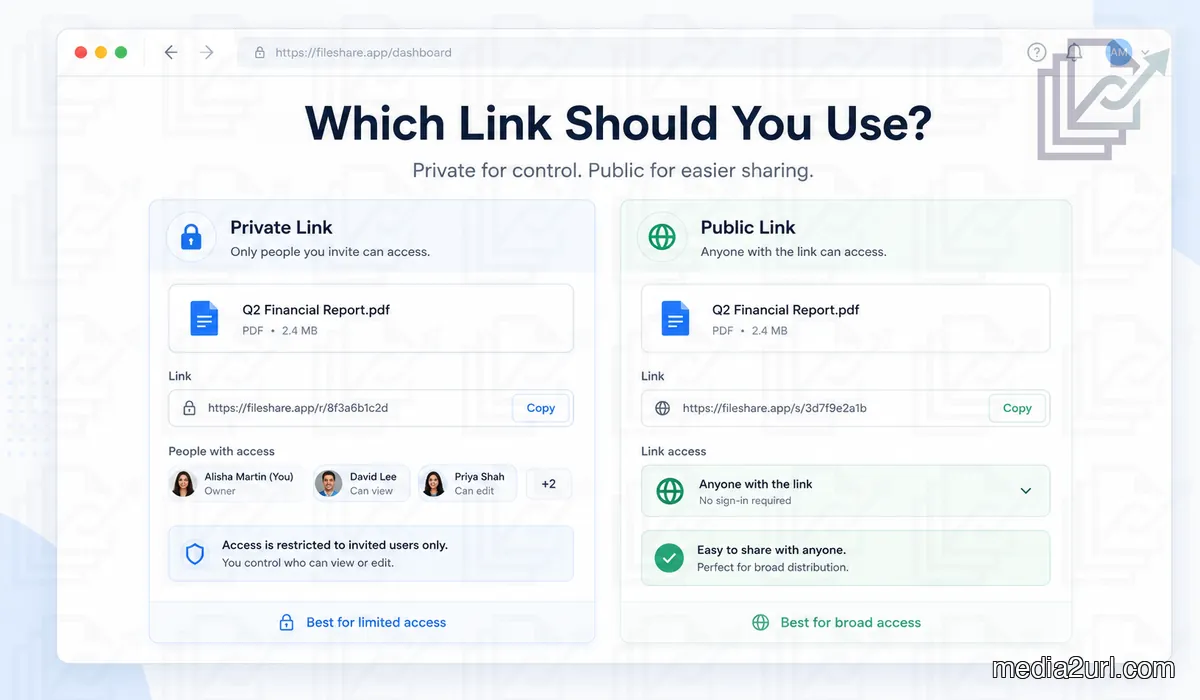
A file is ready to send, and the sharing screen gives you a choice such as Restricted, Specific people or Anyone with the link. The names look simple, but choosing the wrong one normally becomes obvious only after the link has already been sent.
A client may tap a private link and get an access request instead of the document. The opposite mistake is less visible at first: a link meant for two people can be forwarded into another chat and continue opening for everyone who receives it.
The better choice depends on what should happen after the link leaves your hands. If access should stay with particular people, use a restricted sharing method. If the file is genuinely meant to travel and anybody receiving the link can safely open it, a broader link makes more sense.
Quick answer
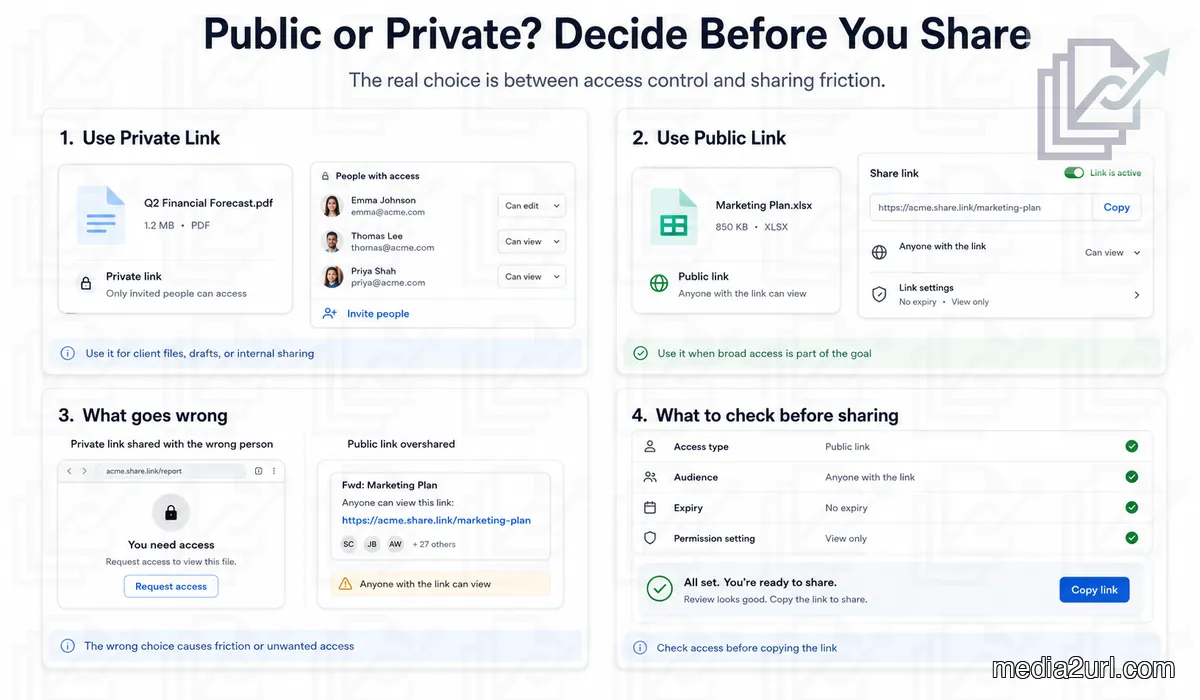
Use a private or restricted link when access should depend on who the recipient is. This fits client drafts, internal files, financial documents and anything that should not become available simply because somebody forwarded the URL.
Use a public or anyone with the link option when easy access is part of the purpose. A brochure, public media kit or downloadable resource normally becomes harder to share if every visitor has to request permission first.
Do not judge the link only by the words public or private. Check the actual setting shown by the service because the same sharing screen may also control whether people can edit, download, comment or keep using the link after a certain date.
What this choice changes for the person opening the link
The access setting decides what happens when somebody receives your URL.
With a broad link, the recipient may be able to open the file immediately. That is useful when the audience includes customers, journalists or people outside your normal account system because the link can do its job without another permission conversation.
A restricted link behaves differently. The service may check the recipient's account or email address before showing the file, which is why somebody can have the correct URL and still see "You need access".
Google Drive, for example, currently separates Anyone with the link from Restricted. A restricted Google file is shared with specific accounts, while anyone with the link access lets people holding that link open it under the selected role.
What people usually mean by public and private links
The wording changes from one service to another, so "public link" is best understood as a broad sharing setting rather than one universal technical link type.
Google Drive uses options such as Anyone with the link and Restricted. OneDrive can show Anyone, organisation only access, People with existing access or Specific people. Dropbox also allows anyone with link access and can limit links to team members in supported workflows.
A private or restricted link normally checks more than possession of the URL. The person may need to be one of the accounts you selected or already have permission through the file, folder or organisation.
The practical difference is simple: with a broad link, having the link may be enough. With a restricted link, who is opening it still matters.
Use a private link when the file should stay with certain people
A private link makes sense when knowing who opened the file matters more than removing every extra step from the sharing process.
Imagine sending a proposal that contains pricing agreed with one client. The file may be perfectly safe to share with that client and still be completely inappropriate for somebody who receives a forwarded message later. Restricting access to the intended account gives that link a boundary beyond simply knowing the URL.
The same thinking applies to draft designs, internal reports and documents that have not been published yet. If forwarding the URL to another person would create a problem, broad link access is probably the wrong starting point.
The trade off appears when the recipient opens it. A private link may require the correct account or another access check, so the sharing experience needs a little more care than simply pasting the URL into a message.
Use a public link when easy access is part of the job
Public sharing is not a careless choice when broad access is exactly what the file is for.
A media kit is a good example. A journalist opening it from a phone should not have to create an account or wait for somebody to approve an access request before downloading the approved company assets.
The same is true for a public brochure or resource linked from a website. If any normal visitor is supposed to open the file, a restricted link would add a permission problem that does not protect anything the business was trying to keep private in the first place.
The important question comes before you copy the URL: would it still be okay if the first recipient forwarded this link to somebody else? If the answer is yes, broader link access may fit the job.
Public or private does not decide whether somebody can edit the file
The audience and the permission level are separate choices on many sharing services.
Google Drive can give someone Viewer, Commenter or Editor access after you decide who can open the file. OneDrive also separates who receives the link from settings such as editing and download behaviour. Dropbox has separate viewing and editing links in supported sharing workflows.
This matters because a file can be broadly accessible without being broadly editable. A public brochure may only need viewing access, while a private draft shared with one colleague may genuinely need editing.
So do not stop after checking who can open the link. Check what those people can do once the file opens.
| Question | Broader link | Restricted link |
|---|---|---|
| Who can normally open it? | Anyone covered by the link setting | Approved people or accounts |
| What if the URL is forwarded? | The next person may also get access | The next person may still be blocked |
| Is sign in always needed? | Often no, depending on the service | Often yes or another identity check is used |
| Can access be removed later? | Usually through the sharing controls | Usually through the sharing controls |
| Does this decide edit permission? | No, check the role separately | No, check the role separately |
| Is it automatically safe to download? | Depends on the service settings | Depends on the service settings |
What changes after a public link starts travelling
The weakness of a broad link usually appears after the first share, not during it.
Somebody forwards the message to a colleague, that person adds the URL to another chat, and the file keeps opening because possession of the link is enough under that sharing setting. Nothing has technically broken. The link is doing exactly what you asked it to do.
The problem begins when the original audience was narrower than the access rule. If the file would become uncomfortable or harmful outside that first group, the link should not have depended only on possession of the URL.
When broad access is still useful, extra controls can reduce how long that exposure lasts. Some services allow expiration dates, passwords or other link settings on eligible plans rather than forcing you to choose between completely open access and a named person workflow.
What goes wrong when a private link is too restrictive
Private sharing creates a different kind of failure. The correct person receives the correct URL, but the file still refuses to open because the account being checked is not the one you approved.
This happens often with outside clients. Somebody receives the link on a work email, opens it from a personal account on the phone and lands on an access screen instead of the document. The next few messages are no longer about the proposal or design; they are about which account to use and whether another permission request was received.
That inconvenience does not make private sharing bad. It simply means the extra restriction needs to solve a real problem.
When the file contains something that should stay with named people, the additional step is worth it. When the file is already meant for anybody who reaches the website, the same restriction only creates unnecessary work.
Sometimes you need easy access without leaving the link open forever
Public and private are not always the only useful outcomes.
A designer may need to send a preview that should open without an account but become useless after the review period. A public event document may need easy access this week without remaining active months later.
In those cases, an expiry setting can make more sense than forcing every recipient into a private account workflow. Passwords or download controls can also add another layer when the service supports them. OneDrive and Dropbox both document several of these link controls in their current sharing options.
Media2URL follows the same idea with its available expiry and temporary sharing controls, so the link can match the lifetime of the sharing task rather than remaining open by accident.
"Anyone with the link" is not always the same as publishing something for search
A link can allow broad access without being presented like a normal public webpage.
For example, Google Drive currently lets owners choose Anyone with the link for general access, and its sharing controls also distinguish whether content can be found through search in relevant sharing situations.
That does not mean the URL should be treated as secret. Once the address appears in a public webpage, forwarded message or another place outside your control, more people can receive it.
A safer way to think about anyone with link sharing is "possession of this URL may grant access", not "nobody else will ever discover this URL."
Private access cannot control everything after the file is opened
Restricting the link controls who gets through the door. It does not guarantee what somebody will do after the content is visible.
Some platforms can hide or block the normal download button. Dropbox explicitly notes that disabling downloads through a shared link does not prevent people from saving the content through other methods, and OneDrive also offers a Block download option for supported sharing situations.
The practical lesson is not to give a restricted link more power than it really has. If viewing the file itself would create a serious problem in the wrong hands, access control helps reduce exposure but cannot turn an ordinary shared document into something impossible to copy.
Share only the version the recipient genuinely needs.
Check the sharing screen before you copy the link
The most useful moment to catch a sharing mistake is while the permission panel is still open.
Start with the audience. If only two named people should see the file, check that the access setting still reflects those people rather than a wider link option. If anybody receiving the URL can safely open it, the broader option may be exactly what you need.
Then look at the permission attached to that audience. A viewer and an editor are not receiving the same access even when both were invited through the same sharing screen.
Finally, think about time. A file meant for a three day review does not always need a link that remains active indefinitely, especially when the service gives you an expiry control.
A simple way to make the decision
Imagine the link is forwarded once after you send it:
- If the next person should not be able to open the file, use a restricted sharing method that checks identity or existing permission.
- If the next person can safely open it and the file was created for broad distribution anyway, the public or anyone with link option is usually the more practical choice.
That one question catches most of the difference without turning the decision into a long security checklist.
Most sharing mistakes happen because the audience changed
A file often starts in one context and ends up being shared in another. Something that was private while a team prepared it may later become a public brochure, while a document copied from a public folder may suddenly contain information intended for one client.
Problems appear when the old access setting survives that change. The link still works, so nobody thinks about the permissions until somebody unexpected opens the file or the intended recipient gets blocked.
Platform terminology can add another layer of confusion. Google may say Restricted, OneDrive may show Specific people, and Dropbox has its own sharing controls. The wording changes, so the safest habit is to read who can access and what they can do, rather than relying on the label alone.
Public or private is different from direct link or share page
These terms answer different questions, so they should not be mixed together.
Public or private is mainly about who can get access. Direct URL or share page is about what kind of destination the link provides after access is allowed.
A file can therefore have a browser share page and still be restricted. Another file may have a broadly accessible direct URL because it was created specifically for public embedding.
If the confusion is about which Media2URL address belongs in HTML, a message or a download button, continue with our Direct URL vs Share Page guide. The access setting should still be checked separately.
How this choice looks inside Media2URL
Media2URL separates the audience decision from some of the other controls around a hosted file.
Depending on the available plan and workflow, an asset can use access options such as Public, Unlisted, Private or protected by a password. Expiry and supported view or download limits can then narrow how long that access remains useful.
The point is not to switch on every restriction. A public brochure does not need a password simply because the control exists, while a client document should not be made public only because copying the link becomes easier.
Start from the real audience and add only the controls that solve a problem for that particular file through Security & Access Controls.
Final thought
The best sharing setting is the one that still makes sense after the link has left your message.
A private link fits when the recipient's identity matters and forwarding the URL should not automatically give another person access. A public or anyone with link setting works better when the file was created for broad distribution and sign in checks would only get in the way.
The choice does not end there. Editing permission, downloads and expiry can still change what somebody is able to do after the link opens.
Before copying the URL, look at the audience once more and ask whether the file would still be safe and useful if the link travelled farther than expected. That answer normally tells you which sharing setting belongs on the file.
Guide review note: This guide was reviewed on August 19, 2026 against current sharing and permission documentation across major cloud storage and link management services including Google Drive, Microsoft OneDrive and Dropbox.